



This is a companion to our earlier piece on how peak shaving dispatch is structured - the control loop, the three generations of logic, and where each fails. That article explains the architecture. This one is for the person who has the system installed, the bills arriving, and a suspicion that it is not performing as promised.
The suspicion is usually right, and the cause is usually not a broken component. It is a parameter left at its commissioning default. Peak shaving controllers ship with a small set of adjustable settings that determine virtually all of their behaviour, and those settings are frequently configured once, during a rushed commissioning, by someone who did not know the site's load shape.
What follows is a practical guide to the eight parameters that matter, what each one actually controls, how to set it from data you already have, and what a wrong setting looks like in the monthly bill. It is written for facility engineers, energy managers and service providers doing peak shaving control tuning on a live system.

Before You Touch Anything
Two prerequisites. First, export at least eight weeks of interval data - site load, battery charge and discharge, state of charge, and the meter reading the utility bills from. Second, confirm which meter the controller is actually reading and where its CTs sit. A surprising share of "algorithm problems" are measurement problems: CTs on the wrong side of the battery's own connection, or a control meter that disagrees with the billing meter by two percent.
Establish a baseline before changing a single parameter: the peak hit rate (share of billing-relevant days where the maximum stayed under target), the daily cycled energy, and the state of charge at the moment of each day's maximum. Those three numbers are your before-and-after.
The Eight Parameters
1. The demand setpoint. The target the controller defends, in kilowatts. This is the single most consequential setting, and the most commonly mis-set in both directions.
Set it from the site's load distribution, not from a round number. Plot the daily maximum over the last twelve months; choose a level the battery can defend on at least 95 percent of days, then check the battery's power and energy against the worst three days. If defending that level requires more energy than the battery holds, the setpoint is a fantasy and the system will fail on exactly the days that set the bill.
Wrong-setting symptom: the site exceeds the target two or three times a month, and each time by a small margin in the last hour of the afternoon - a classic sign the setpoint was set for average capability rather than worst-case reserve.
2. Deadband and hysteresis. The band around the setpoint within which the controller does nothing, and the offset required before it releases. Too narrow and the system chatters, cycling the battery on measurement noise and burning warranty throughput for no billed benefit. Too wide and it lets real excursions through.
Set the deadband at roughly two to three times the metering noise you observe at rest - commonly 5 to 15 kW on a commercial site - and the release hysteresis a little wider than the deadband so the system does not oscillate at the boundary.
Wrong-setting symptom: cycle counts far above the dispatch plan, with no corresponding reduction in the billed peak.
3. Activation delay and response dead time. How long the load must stay above setpoint before discharge begins. A short delay catches genuine peaks but reacts to transient spikes that would never have set a 15-minute billed demand. A long delay smooths the response but may arrive too late.
Set it against the billing interval: a delay of 10 to 30 seconds is usually appropriate for 15-minute billing, because a spike shorter than that cannot move the interval average much. Sites billed on 5-minute intervals need shorter delays.
Wrong-setting symptom: the battery responding to every compressor start, or arriving late to genuine ramps and recording a peak in the first interval.
4. Ramp rate on entry and exit. How fast discharge increases and, more importantly, how it stops. An abrupt stop creates a step in the site load that can itself set a new peak - the battery pulls back, the load steps up, and the meter records the rebound.
Exit ramps of 30 to 90 seconds are typical. Entry ramps can be faster, limited only by the PCS.
Wrong-setting symptom: a peak recorded immediately after a discharge event ends, often higher than the peak the battery was responding to.
5. Minimum state of charge floor. The hard limit below which shaving cannot go. It protects cycle life and preserves a resilience reserve, but set too high it removes usable capacity exactly when the site needs it.
Set it from two inputs: the warranty's minimum SOC, and the resilience requirement. If the site has no backup obligation, the floor is the warranty limit plus a small margin. If it does, the floor is the reserve, and the shaving algorithm must treat everything above it as spendable.
Wrong-setting symptom: the battery stops discharging at 40 percent SOC on peak days while the site exceeds its target - energy available, permission refused.
6. Forecast reserve. The state-of-charge buffer held for the largest expected excursion later in the day. Reactive controllers do not have this parameter; forecast-assisted ones do, and it is usually expressed as a percentage of capacity or as a minimum SOC trajectory by hour.
Set it from the observed spread between morning and afternoon peaks. A site whose maximum lands at 4 pm needs a reserve that survives the morning, which means the morning reserve must be larger than the afternoon requirement - not equal to it.
Wrong-setting symptom: the battery is empty by 2 pm on the days the site peaks at 4 pm, and the peak is recorded at the setpoint plus whatever the empty battery could not cover.
7. Charge power limit and charging window. How fast and when the battery recharges. Charging is itself a load, and a controller that recharges at full rate during the day can create a peak while trying to prevent one.
Set the charge limit so that the site load plus charging stays below the setpoint, and prefer windows that coincide with low site load or low tariff. Where solar is present, the charging window should follow the solar surplus rather than a fixed clock.
Wrong-setting symptom: a new monthly maximum recorded at 11 am, during a period when the building was quiet but the battery was charging hard.
8. Daily throughput and cycle cap. The guardrail against an algorithm that optimises today's demand charge into an early warranty claim. Set it from the warranty's annual throughput allowance divided into daily equivalents, with headroom for high-demand months.
Wrong-setting symptom: excellent peak performance in year one, followed by a capacity shortfall at the year-five guarantee measurement.

The Tuning Workflow
Change one parameter at a time, and give each change at least two weeks - one to settle, one to observe across a full weekly load pattern. Record the three baseline metrics after each change.
Work in this order, because later parameters depend on earlier ones: measurement verification, then setpoint, then floor and reserve, then deadband and delays, then ramp rates, then charging. Tuning ramp rates before the setpoint is settled produces results you cannot attribute.
Do not tune during an abnormal month. A shutdown week, a heatwave or a construction period will teach you the wrong lesson. If the site has no normal month available, tune against historical data in simulation first and apply the parameters with a documented rationale.
The Monthly Ritual
Tuning is not a one-time event. The load changes, the tariff changes, the battery degrades, and the settings that were right in March are wrong in July.
A twenty-minute monthly review prevents most drift: check the peak hit rate against the target, check the SOC at the daily maximum, check the cycle count against plan, and identify the single worst interval of the month. Trace that interval. In most months it will point to one of the eight parameters above, or to a load change the settings have not caught up with.
That ritual - one number, one trace, one adjustment - is worth more than any algorithm upgrade. The peak shaving control tuning that actually moves the bill is rarely sophisticated; it is disciplined, data-driven, and repeated.
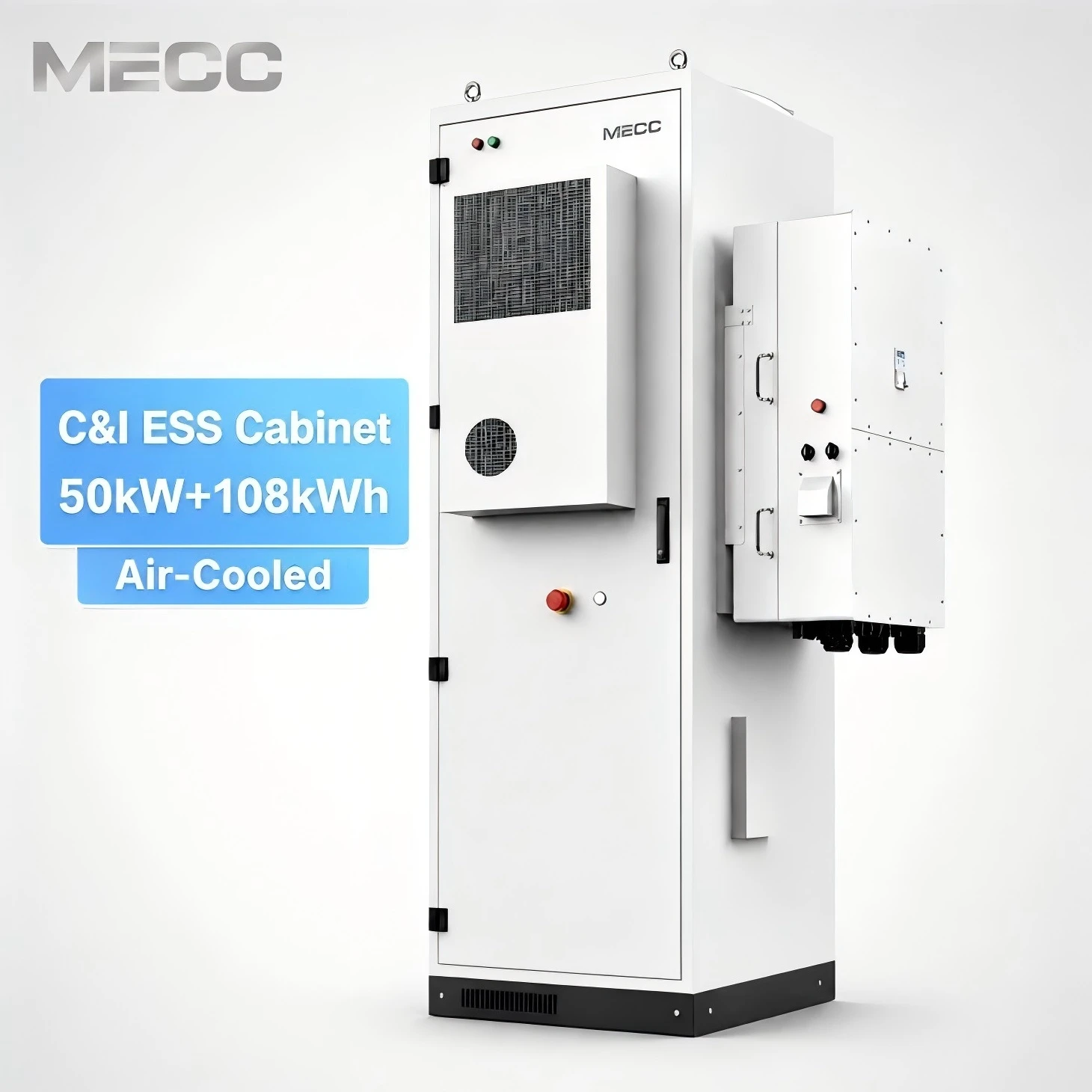
MECC 50KW 108KWH BESS Battery Energy Storage System
The MECC 50kw 108kWh Battery Energy Storage Cabinet is a high-capacity energy storage solution designed for industrial and commercial applications. Featuring 345.6V, 314Ah lithium iron phosphate (LiFePO4) battery, it ensures long-lasting, safe, and efficient energy storage.
High-efficiency 50kW/108kWh Industrial and Commercial Energy Storage System (C&I ESS). Features LiFePO4 battery, peak shaving, and smart EMS. Reduce operational costs and ensure power backup. Inquire for custom BESS solutions.
Designed with a compact footprint of less than 1.2 square meters, this 108kWh cabinet features a pre-integrated all-in-one design, reducing on-site installation time by 40% compared to modular rack systems.